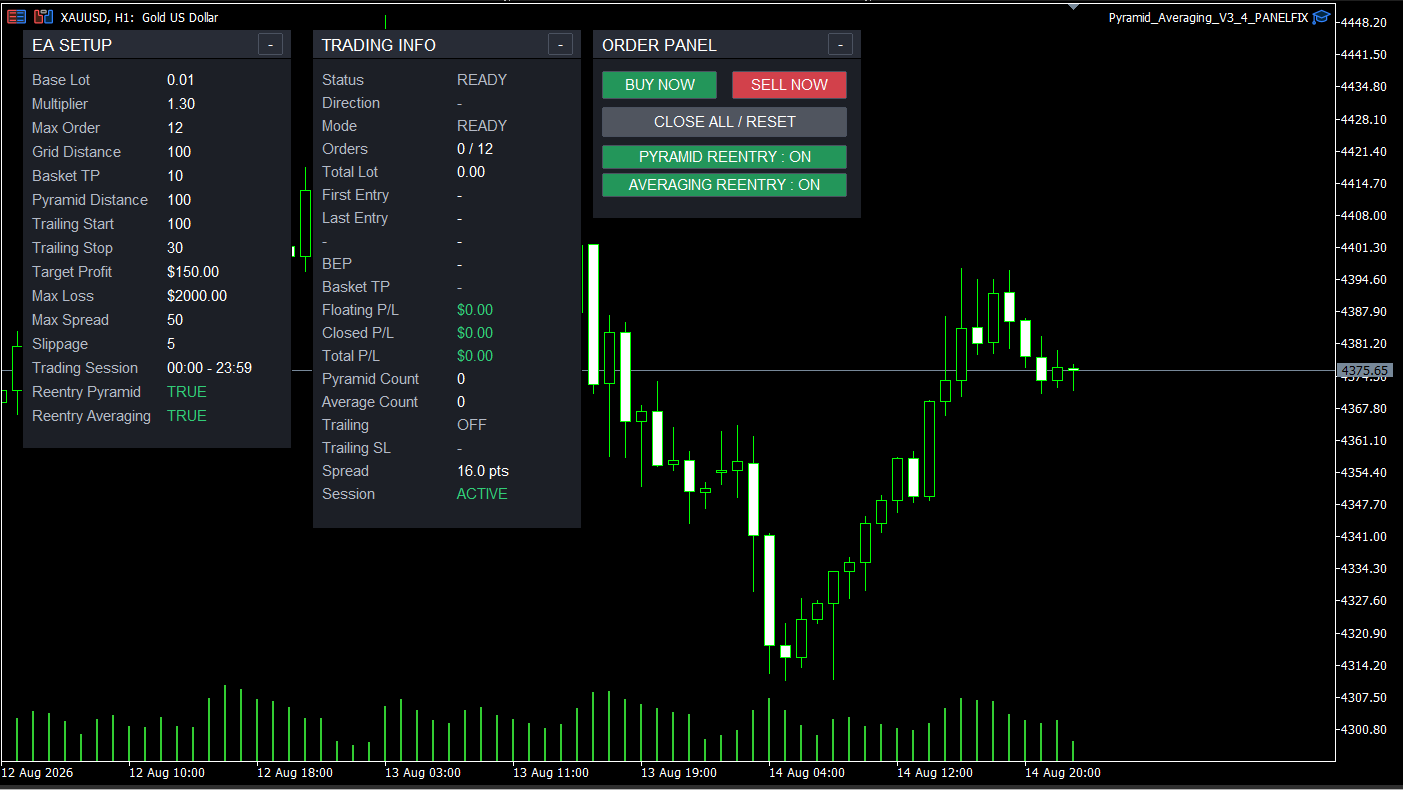
Three Merah Putih Tools V3 panels right on your MT5 chart — EA Setup, Trading Info, and Order Panel — for manual BUY/SELL control, monitoring pyramid/averaging baskets, and real-time protection settings.
Semi-automatic tools to help execute and manage your trading positions — usable on all pairs, exclusively for trading accounts that are registered and active at Indorebate.
Three Merah Putih Tools V3 panels right on your MT5 chart — EA Setup, Trading Info, and Order Panel — for manual BUY/SELL control, monitoring pyramid/averaging baskets, and real-time protection settings.
This EA can only be used with trading accounts that are registered and active in the Indorebate network. If you use an Indorebate partner broker but your account has not been validated in our system, the EA cannot be activated. Don't have a registered account yet? Register here or validate your account first.
Before using it, make sure you fully understand how it works and its risks. This EA is built to assist the trading process, not to replace your strategy and your decisions as a trader.
The EA helps automate technical matters after you decide to enter — it does not make trading decisions for you.
| Features | Description |
|---|---|
| Manual Entry via Order Panel | BUY NOW / SELL NOW buttons right on the chart — you decide the direction and timing of the first entry. |
| Auto Pyramid | When price moves in the profit direction by the Pyramid Distance, the EA adds a new position following the trend, then immediately places a basket stop loss at the Pyramid SL distance behind price — and trails it every time a new pyramid order is formed. |
| Auto Averaging / Martingale | When price moves against the position by the Grid Distance, the EA adds a position with multiplied lots according to the Multiplier to chase break-even (BEP). |
| Auto Basket TP | Once averaging mode is active, the EA calculates the BEP of the whole basket and automatically places a Take Profit at the Basket TP distance from that BEP. |
| Trailing Stop Pyramid | While positions are still in pyramid mode (not yet averaging), the "Trailing" status on the panel is active and the Trailing SL automatically locks in basket profit at the Pyramid SL distance from the running price. |
| Auto Re-Entry | A single RE-ENTRY button on the Order Panel — when ON, the EA automatically reopens a position in the same direction after the basket closes, whether through the pyramid trailing stop or the averaging Basket TP. |
| Target Profit & Max Loss (USD) | Automatically closes all positions once the session's total profit (closed + floating) reaches the Target Profit, or when floating loss reaches the Max Loss limit you set (default OFF/disabled). |
| Spread & AutoTrading Status Filter | The EA only opens new orders while the spread is below the Max Spread limit and the AutoTrading/Algo Trading button in MT5 is enabled — this status is shown in real time on the "Session" row of the panel. |
| 3-Panel Monitoring Display | EA Setup, Trading Info, and Order Panel show the status, direction, mode (GRID+PYRAMID/GRID ONLY), number of orders, BEP, Basket TP, Floating/Closed/Total P/L, and Trailing status in real time. |
Many people are still unsure how to set up and use Merah Putih Tools V3 — so we made a complete video tutorial below.

Complete tutorial on installing & setting up Merah Putih Tools V3 — TomzTechno (in Indonesian)
Register a trading account via the Indorebate referral link → Activate & validate your rebate member status → Check your email → Check the Password for activating Merah Putih Tools.
⚠️ The EA is only given to accounts verified as registered at Indorebate.
By using this EA, you understand and agree that trading decisions, results, and risks are entirely your own responsibility as the user.