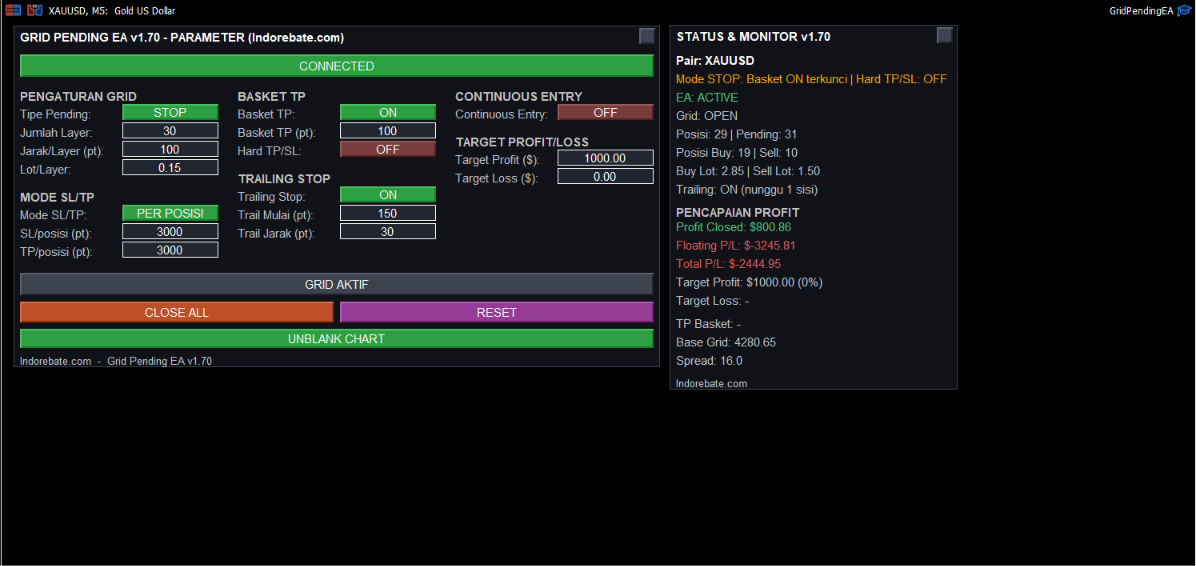
Two Grid Pending EA v1.70 panels right on your MT5 chart — Parameters (grid settings, SL/TP, Basket TP, trailing, continuous entry, target profit/loss) and Status & Monitor (positions, floating/closed/total profit in real time).
A two-way grid pending order EA (Buy & Sell) with a full-control dashboard panel right on the chart — Basket TP, trailing, continuous entry, up to automatic target profit/loss. Exclusively for trading accounts that are registered and active at Indorebate.
Two Grid Pending EA v1.70 panels right on your MT5 chart — Parameters (grid settings, SL/TP, Basket TP, trailing, continuous entry, target profit/loss) and Status & Monitor (positions, floating/closed/total profit in real time).
This EA can only be used with trading accounts that are registered and active in the Indorebate network. Don't have a registered account yet? Register here or validate your account first.
This EA opens many pending orders at once in two directions (grid), then manages open positions automatically. A grid strategy like this can be effective in ranging markets, but it is very risky if price moves strongly in one direction without reversing — make sure you understand how it works before using real capital.
All features are controlled directly from the dashboard panel on the chart — no need to change code or settings through the EA input window.
| Features | Description |
|---|---|
| Two-Way Grid Pending | Opens Buy & Sell pending orders at once from the market price when the EXECUTE button is pressed. The pending type can be Stop (following breakouts) or Limit (mean-reversion). |
| SL/TP Per Position or Global | Choose "Per Position" mode (fixed SL/TP for each layer) or "Global" (calculated from the outermost layer, applied equally to all positions on the same side). |
| Basket TP (Combined) | Automatically closes all positions when price reaches the combined breakeven (BEP) + the set distance. In Stop mode, it is active if both sides have positions; in Limit mode, it can be active even when only one side is open. |
| Hard TP/SL (ON/OFF) | ON (default): the real TP/SL stay placed at the broker as a double safeguard. OFF: all broker TP/SL are removed, and basket closing is controlled purely by the EA through price checks on every tick. |
| Automatic Trailing Stop | Runs automatically only when positions are open on one side only (full Buy only or full Sell only), locking in profit as price moves in that direction. |
| Continuous Entry | Once a grid cycle has fully closed, the EA automatically opens a new grid from the latest market price — without needing to press Execute again manually. |
| Target Profit & Target Loss (USD) | Once the target is reached, the EA closes all positions and turns itself off (press CONNECT again to reactivate). |
| Full Dashboard Panel | Shows the pair name, number of open Buy/Sell positions, Trailing status, active Basket TP level, and floating/closed/total profit in real time. |
| Draggable & Minimizable Panels | The parameter panel and info panel can be dragged to any position on the chart (the position is saved automatically) and minimized via the "_" button in the top right corner. |
| Blank Chart Mode | Hides the default candles, grid, and volume of the chart (plain background) so you can focus on the EA panels — can be restored any time with the same button. |
Register a trading account via the Indorebate referral link → Activate & validate your rebate member status → Check your email → Check the Password for activating Grid Pending Tools.
⚠️ The EA is only given to accounts verified as registered at Indorebate.
By using this EA, you understand and agree that trading decisions, results, and risks are entirely your own responsibility as the user.